
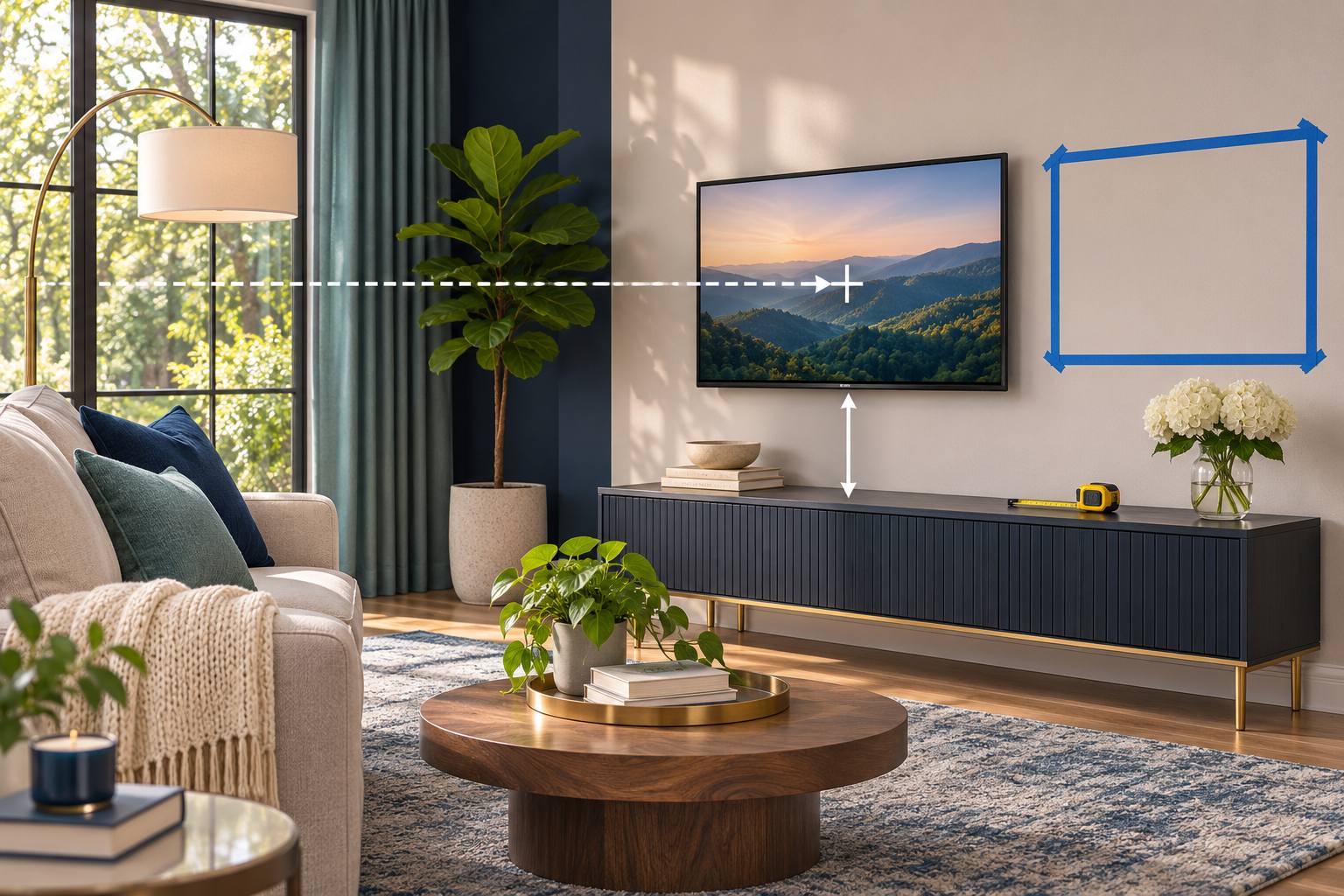
Define what your height measurement means.
- Center height
- Floor to the center of the visible screen. This is the useful starting point for comparing viewing positions.
- Bottom-edge height
- Floor to the bottom of the cabinet. It depends on the TV's overall height and must clear furniture or a soundbar.
- Wall-plate height
- The bracket's installation position. It depends on the TV's hole placement and mount design, not just screen size.
Test the position before making holes.
Measure your seated eye level
Sit in your normal viewing position with your usual posture and cushions. Have someone measure from the floor to your eyes. Repeat for the main seats if several people use the room. A fixed internet recommendation cannot account for every sofa, recliner and viewer. Sony's height guidance likewise treats the screen center at viewer eye level as a general starting point and says preference and seating arrangement matter. Measure more than one seat when the room is shared, then choose a compromise that still leaves the picture comfortable for the primary viewing position. A recliner or bar stool can change the line considerably.
Mark a proposed screen outline
Use removable tape on a suitable wall surface to outline the TV's actual cabinet dimensions. Place the screen center near the eye-level starting point. Sit down and look naturally at the whole outline, including where subtitles would appear. Keep the tape off delicate finishes if it could damage them. Mark both the cabinet outline and the visible screen area if they differ noticeably. That makes it easier to judge subtitles and the lower edge. Sony's wall-mount FAQ also calls out lighting and viewing distance as part of the position choice. Check daytime reflections from windows and lamps while the outline is still easy to move. Do not place tape over wallpaper or paint that it could damage.
Check furniture and soundbar clearance
Allow room for a soundbar without blocking the screen, remote sensor or required ventilation. Compare the TV's bottom edge with the console top. If furniture forces the screen too high, consider a lower console or a different layout rather than accepting discomfort automatically. Check the exact model's ventilation requirement, not just the visible gap. LG's installation checklist illustrates clearances for wall-mounted sets and reminds buyers to verify the route into the room. A soundbar should not cover the bottom of the picture or block the TV's remote receiver. Also plan access to outlets and connectors without pinching or sharply bending cables.
Translate the outline into mount placement
Follow the mount's template and TV mounting diagram. The VESA holes can sit above or below the cabinet center, and hooks or rails add their own offset. Confirm the final screen position from the assembled bracket geometry before marking the wall plate. Make a sketch with four labeled values: floor-to-screen-center height, cabinet height, distance from cabinet edge to the TV mounting holes, and the mount's rail-to-wall-plate offset. Use the manufacturer's dimensions where available. If the screen is centered vertically in a 28-inch-tall cabinet, its bottom is about 14 inches below the center. The wall plate may be above or below that line depending on the hardware. Confirm with the mount's own template before any drilling.
Confirm the wall and viewing result
Have the wall construction and appropriate fixing method established before installation. Use the assistance required to lift the TV. After installation, check that it is secured and level, then reassess the main seats. Adjust only within the mount's documented range. Height planning does not establish that a wall can carry the load. LG's wall-mounting guidance says wall type and installation environment can restrict the job and recommends a professional technician. Use the TV and mount instructions for the correct fasteners, wall assessment and lifting procedure. Do not infer safety from the TV weight or VESA pattern alone.
Find the symptom. Check the cause.
The TV feels too high despite following a guide
Recheck whether the quoted measurement was for the center, bottom edge or bracket. Also consider your actual seated position. A large screen can have a low bottom edge while its center is still at a comfortable height. Sit in the usual posture for several minutes while looking at the mockup. If your neck tilts upward or your eyes repeatedly leave the picture, lower the outline before moving on to bracket measurements. A tilting mount may aim the image toward you, but it cannot move the whole screen down.
The planned location is above a fireplace
Heat, wall construction and a high viewing angle all need assessment. Samsung advises against mounting above a fireplace. A tilting bracket does not remove heat exposure or automatically make an elevated location comfortable. Check the fireplace maker's clearance and the TV manufacturer's environmental limits. If either is uncertain, use another wall or a stand. A high mantel can also create a poor viewing angle from a sofa even if the mount tilts.
The mounting holes miss the expected height
The hole pattern is not necessarily centered on the screen. Use the TV and bracket drawings to calculate the correct offset. Do not move the drill marks by guesswork after the wall plate has been positioned.
A simple height example, with clear limits.
Suppose your chosen screen-center height is 42 inches and the cabinet is 28 inches tall, with its screen centered vertically in that cabinet. The approximate bottom edge would be 42 minus 14, or 28 inches above the floor. This example explains the geometry. It does not prescribe 42 inches for every room or locate the wall-plate screws.
A reclining bedroom position can need a different viewing line from an upright living-room seat. Test the actual posture and layout. Our TV measurement guide helps establish the dimensions, while wall-construction guidance explains why fixing choices cannot be based on weight alone.
For a worked placement record, suppose the seated eye line and chosen screen center are both 42 inches above the floor. A cabinet 28 inches tall would put its lower edge near 28 inches if the visible screen and cabinet are centered together. A soundbar or console may make that too low, so move the outline and recheck comfort. The example is geometry, not a universal recommendation or a wall-plate dimension.
Before buying a mount, confirm the TV's exact model, VESA hole spacing, weight without stand, screw specifications and any required spacers. Match those to the mount's rated range and installation manual. A compatible hole pattern does not prove that the wall and fasteners are suitable. If the wall construction is unknown, have it identified by a qualified installer before planning the drilling location.
Model-aware instructions.
This guide draws on manufacturer and standards sources reviewed for the November 18, 2026 editorial update. We distinguish common steps from model-specific requirements and link relevant official guidance in the FAQs.
Menu names, app interfaces and supported features can change. Use the manual for your exact model when it differs from a general procedure. This is researched guidance, not a claim that we tested every television, app or accessory described.
A little more clarity.
What is the ideal height for a wall-mounted TV?
Start with the center of the screen near your natural seated eye level, then test the outline from the seats you use. SANUS's HeightFinder explains how TV dimensions and mounting-hole positions affect the bracket location. Treat any calculator's default number as a starting estimate. Enter your actual seating and TV details, then check the taped outline from the room before committing.
Should the bottom of the TV be at eye level?
Usually the starting reference is the screen center, not its bottom edge. Putting the bottom at eye level can move much of the picture above your normal line of sight. Check comfort with a full-size outline before committing to a position.
Does a bigger TV need to be mounted higher?
Not automatically. Keeping the screen center at the same height makes a taller TV extend farther both upward and downward. Check the lower edge against furniture, soundbar clearance and the room layout rather than raising it solely because the diagonal increased.
Can a tilt mount solve a TV that is too high?
Tilting can help aim the display toward the seats, but it does not change the height of the image or remove an uncomfortable viewing posture. Test the location first. A lower mounting position may be more useful than a larger tilt angle.
Can I mount a TV above a fireplace?
Do not assume the wall is suitable because there is space. Heat and installation conditions need checking, and the height may be uncomfortable. Samsung's wall-mounting guidance advises against a fireplace position. Consider another wall or a stand.
Is the VESA pattern enough to calculate the drill height?
No. VESA spacing gives the distance between TV mounting holes, not their offset from the cabinet edge or the mount's hook geometry. Use both the television drawing and the bracket template to work back from the intended screen position.
 Measure the complete television
 Check the wall construction
 Choose the right screen size